A professional headshot used to mean booking a photographer, finding an outfit, and hoping the lighting cooperated. For most people, that process is either too expensive, too time-consuming, or both — which is why so many LinkedIn profiles, team pages, and resumes are still running on old photos or casual selfies.
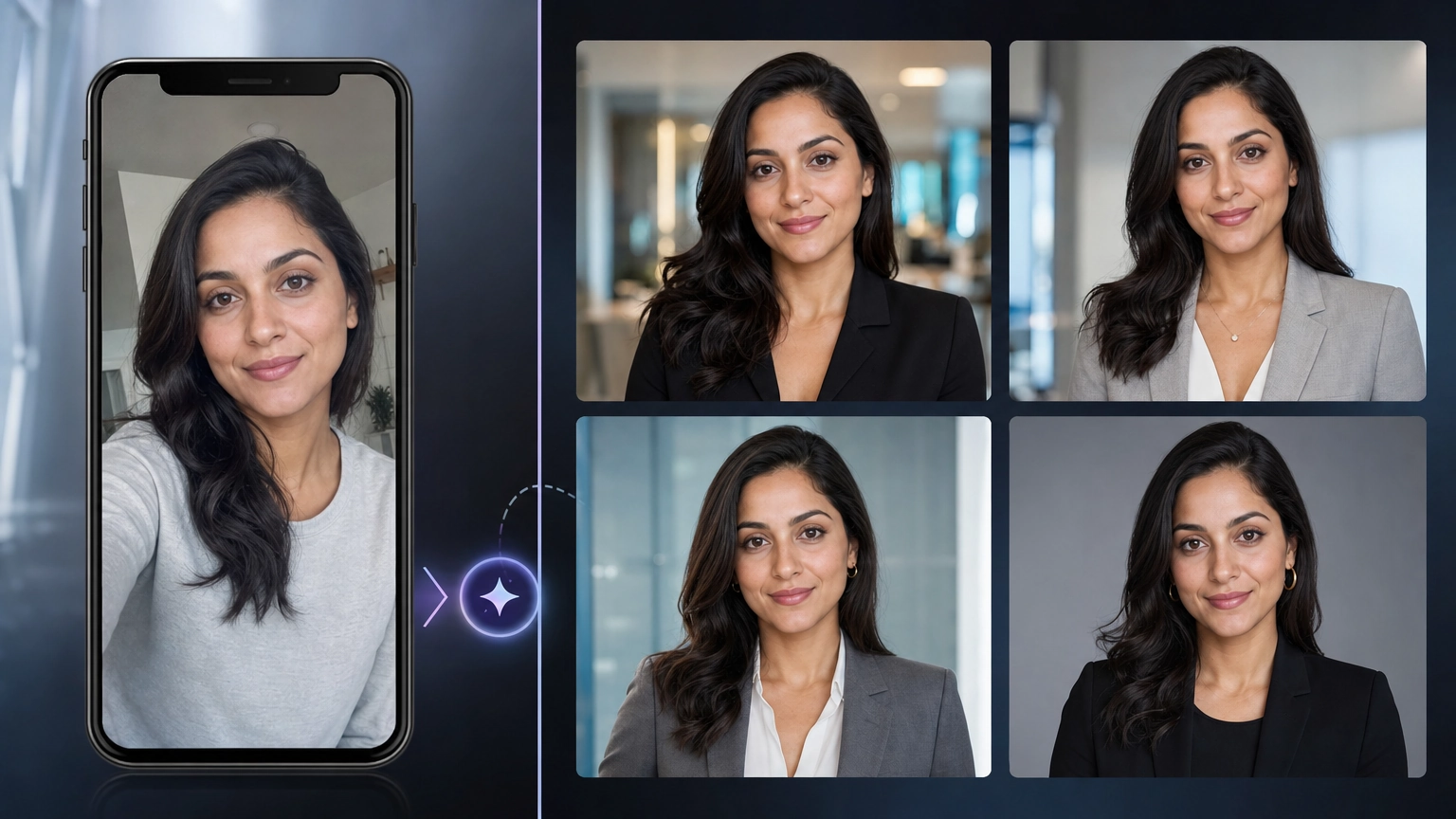
Fiddl.art's AI Headshot Generator turns one selfie into professional headshot variations in seconds. No studio, no photographer, no scheduling.
What Is an AI Headshot Generator?
An AI headshot generator uses an uploaded photo as a reference and creates professional profile photo variations with updated lighting, background, crop, outfit direction, and polish. Fiddl.art's tool focuses on realistic headshots — not cartoon avatars or illustrated likenesses.
The output is designed for real professional use: LinkedIn profiles, resumes, team pages, and business profiles.
How It Works
The workflow is three steps.
Step 1: Upload a clear selfie
Choose one adult photo where your face is clearly visible, the expression is natural, and the image has enough detail for identity-preserving edits. A clear selfie or portrait works well. Avoid heavy filters, sunglasses, extreme angles, strong shadows, or photos where your face is partially covered.
Step 2: Pick a professional direction
Select a preset that matches your intended use. One tap sets the whole look — no typing needed. Available presets include:
- LinkedIn professional — clean, approachable business profile photo with neutral styling and realistic lighting
- Corporate team page — polished output suited for company directories and team pages
- Startup — modern, approachable style for founder and early-stage team profiles
- Medical — professional styling appropriate for healthcare profiles
- Real estate — warm, trustworthy presentation for agent profiles and listings
- Creative — expressive styling for portfolio and creative industry profiles
- Creator — casual-professional look suited for content creator profiles and social bios
Then customize further if desired with additional options: industry, headshot style, background, outfit, and expression.
Step 3: Review your private headshot results
Results are private by default — your headshot is based on a real person's face and professional identity, so nothing is shared publicly unless you explicitly choose to. Compare the generated variations, open the strongest result, download it, or remix it.
Identity Preservation
The default prompt emphasizes identity preservation — face structure, age, skin tone, hair, facial hair, expression, distinctive features, and natural likeness. The goal is a headshot that still looks like you, just more polished.
Generative models can still vary, so compare results carefully and regenerate if the likeness drifts. The tool produces realistic headshots, not idealized or heavily altered versions of your appearance.
Pricing
The default run generates 4 headshot variants at approximately 200 credits. You can adjust the quantity — credits scale with however many variants you choose. Fiddl.art gives you the flexibility to choose how you pay — pay-as-you-go, subscribe, or both. It's completely up to you. See our blog Free AI Image Generator: No Subscription Required, Pay-As-You-Go Pricing (2026) for a full breakdown of how credits work.
Tips for Best Results
Use a recent, clear photo
The AI works from the detail in your source image. A sharp, well-lit selfie with your face fully visible gives the best starting point. The cleaner the input, the stronger the output.
Match the preset to the platform
A LinkedIn professional preset is not the same as a creative portfolio headshot. Pick the preset that matches where the photo will be used — the lighting, background, and styling are optimized for that context.
Generate multiple variants and compare
The default run produces 4 variants. Compare them before downloading. Small differences in expression, lighting, and crop can make one variant significantly stronger than another.
Review before publishing
Always review the output carefully — especially around fine facial details — before uploading to a live profile. AI edits can occasionally introduce subtle inconsistencies.
What It Is Not For
Fiddl.art's AI Headshot Generator is for professional profile photos, team pages, resumes, and creator profiles. It does not meet requirements for government ID, passport, access badge, licensing, or credential photos. Do not use it for official document photography.
You also need permission to generate a headshot. Use your own photo or a photo you have permission to edit. Consent matters for any identity-based image tool, especially when the result will be used professionally.
Frequently Asked Questions
What is an AI headshot generator?
It uses an uploaded photo as a reference and creates professional profile photo variations with updated lighting, background, crop, outfit direction, and polish. Fiddl.art's tool focuses on realistic headshots — not cartoon avatars.
Can I use it as a LinkedIn headshot generator?
Yes. The LinkedIn professional preset is designed for a clean, approachable business profile photo with neutral styling and realistic lighting. Review the result before uploading it anywhere professional.
Will the generated headshot still look like me?
The default prompt emphasizes identity preservation — face structure, age, skin tone, hair, facial hair, expression, and natural likeness. Generative models can still vary, so compare results carefully and regenerate if the likeness drifts.
What kind of selfie works best?
A clear adult selfie or portrait with the face visible, minimal blur, natural expression, and enough image detail. Avoid heavy filters, sunglasses, extreme angles, strong shadows, or photos where the face is partially covered.
Are AI headshot results public?
No. Results are private by default because the input is a real person's face and professional identity. You make an explicit choice before sharing any result publicly.
Can I choose the background and outfit?
Yes. Background options include studio gray, office, outdoor soft blur, clean white, warm neutral, and custom. Outfit options include keeping the original clothing, suit or blazer, business casual, creative casual, and medical coat.
Can I make official ID, passport, or credential photos?
No. This tool is for professional profile photos, team pages, resumes, and creator profiles. It does not meet government ID, passport, access badge, licensing, or credential photo requirements.
Do I need permission to generate a headshot?
Yes. Use your own photo or a photo you have permission to edit. Consent matters for any identity-based image tool, especially when the result might be used professionally.
How much does it cost?
4 variants costs approximately 200 credits by default. Adjust the quantity and credits scale with it. Pay-as-you-go, subscribe, or both — your choice.
Start Generating Your Headshot
Turn a single selfie into professional-quality headshots in minutes. Open Fiddl.art's AI Headshot Generator, upload your photo, pick a preset, and generate your first set of headshot variants.
For more on creating realistic AI portraits and headshots, see our guides to AI portrait prompts, realistic photo prompts, and free AI LinkedIn photo generators.