AI Object Remover
AI Object Remover
Upload a photo, describe the object or distraction to remove, and get a clean result that keeps the rest of the image intact.
Tool summary
- Input
- Image upload required, up to 1 input image
- Model
- gpt-image-2
- Default aspect ratio
- 1:1
- Output
- Remove object
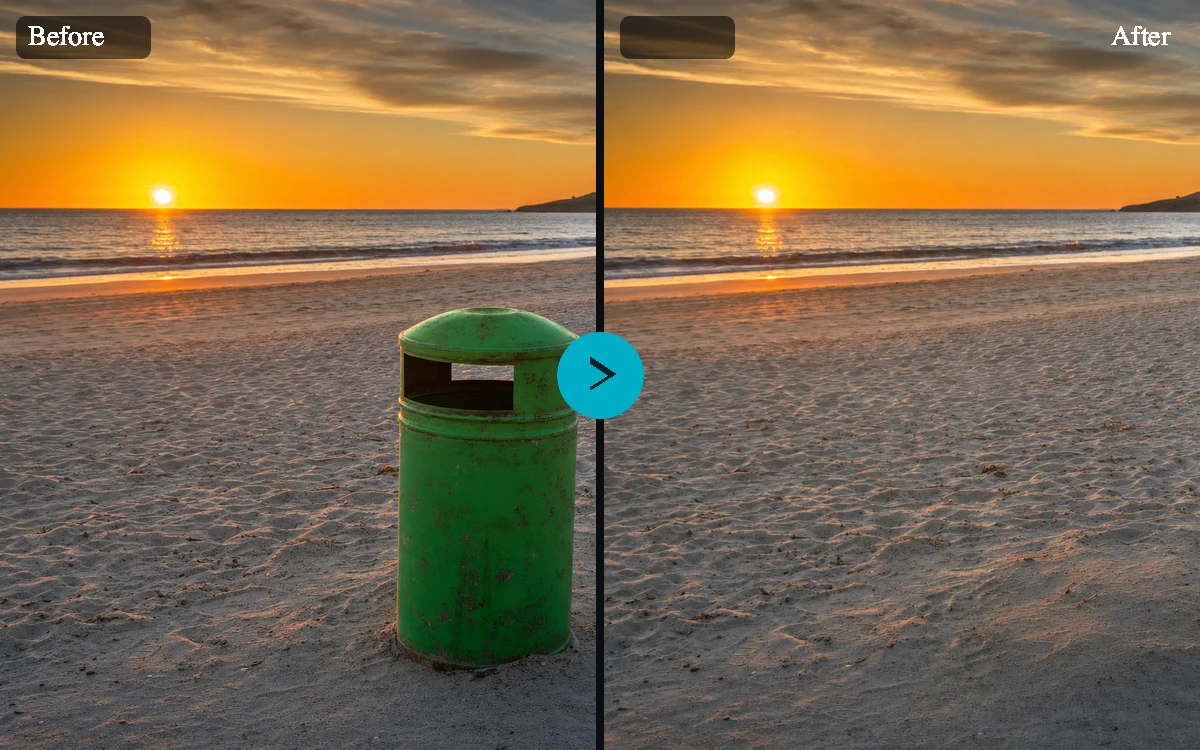
Remove unwanted objects from photos with guided AI editing
The AI Object Remover is built for practical image cleanup: upload a photo, describe exactly what should be removed, and choose how strictly the rest of the image should be preserved. The goal is a natural-looking cleanup, not a restyled image.
Built for precise photo cleanup, product shots, and backgrounds
Object removal works best when the target is clearly named. A prompt like "remove the red traffic cone at the bottom right" gives the tool stronger context than a generic request. Presets help with common jobs such as removing photobombers, cleaning product images, repairing outdoor scenes, and erasing thin wires or cables.
Keep the original image recognizable
Object removal preserves framing, subject identity, lighting, color, shadows, texture, and product details. That makes this a focused image cleanup tool rather than a broad image generator.
Cleanup that fits right into your workflow
Remove distractions, review the cleaned-up result, and download it or open it in Create to keep working. Your photo stays the same image, just without the clutter.
Use case
Remove photobombers, trash cans, signs, wires, and small background distractions while keeping the main subject and composition intact.
Use case
Clean stickers, dust, props, glare marks, packaging blemishes, and table clutter without rewriting important product details.
Use case
Tidy exterior and interior photos by removing bins, cords, vehicles, wall marks, or temporary objects before publishing a listing.
Use case
Remove placeholder elements from concept images so teams can compare cleaner variants before committing to a final edit.
AI Object Remover examples
Example presets
- Remove a photobomberRemove the person in the background on the left and rebuild the street scene naturally.
- Clean product photoRemove the small price sticker and dust specks from the product box while keeping all packaging text intact.
- Erase street clutterRemove the trash bin near the curb and continue the sidewalk, curb shadow, and wall texture realistically.
- Remove a wire or cableRemove the black cable crossing the table and restore the wood grain and soft shadow underneath.
Controls and settings
- Object to removeDescribe the exact object, person, shadow, logo, wire, stain, or distraction to remove.
- Background fillChoose from Natural fill, Clean surface, Product-safe repair, Outdoor scene repair.
- Preserve imageChoose from Strict preservation, Balanced cleanup, Commercial polish.
- Edge detailChoose from Clean edges, Fine detail, Soft background.
- Keep original framingKeep the original crop and framing exactly as close as the model allows.
- Aspect ratioSupports 1:1, 4:5, 3:4, 4:3, 16:9, 9:16 with 1:1 as the default.
- VariationsGenerate 1 to 4 variants. Default: 1.
Responsible object removal
Use object removal for cleanup, restoration, design iteration, and photos you have permission to edit. Do not use it to falsify evidence, alter identity documents, misrepresent products, remove ownership marks, or create deceptive claims.
Frequently asked questions
What is an AI Object Remover?
An AI Object Remover is an image editing tool that removes selected objects, people, marks, or distractions from a photo and fills the missing area using surrounding visual context.
What kinds of objects can this remove?
It handles common cleanup targets such as background people, trash cans, signs, wires, product stickers, dust, wall marks, glare spots, props, and small distractions.
Do I need to upload an image?
Yes. This tool is configured as a required-upload edit workflow because object removal needs a source image to preserve and repair.
Will the rest of my photo change?
The prompt is designed to preserve framing, lighting, color, subject identity, text, and product details. Generative edits can still vary, so users should review outputs before publishing.
Can it remove people from the background?
Yes, the prompt presets include background people and photobombers. The user should only edit images they have rights to use and should avoid deceptive or harmful edits.
Can this remove watermarks or copyrighted marks?
No. This is not a watermark bypass tool. Use it to remove objects in images you own or have permission to edit.
Does this work without signing in?
You can set up your photo and describe the edit on the page, but you'll need to sign in or create an account to generate the cleaned-up result.
Where do finished images go?
When you're signed in, your finished images are saved to your Fiddl media history and linked to their own image pages.